
Download the Schools Marketing Toolkit
Hello everyone, welcome to week six of the Digital Marketing Health Check for your school. Today we are looking at Messenger marketing. First of all, I will tell you a little bit about what Messenger marketing is and then I’ll go through a few elements that you need for successful marketing on Facebook Messenger.
If you are not working with us through the Digital Marketing Health checklist, it’s a 60 point checklist that I made available in my school’s marketing toolkit.
Click here to access the toolkit and work through the checklist yourself.
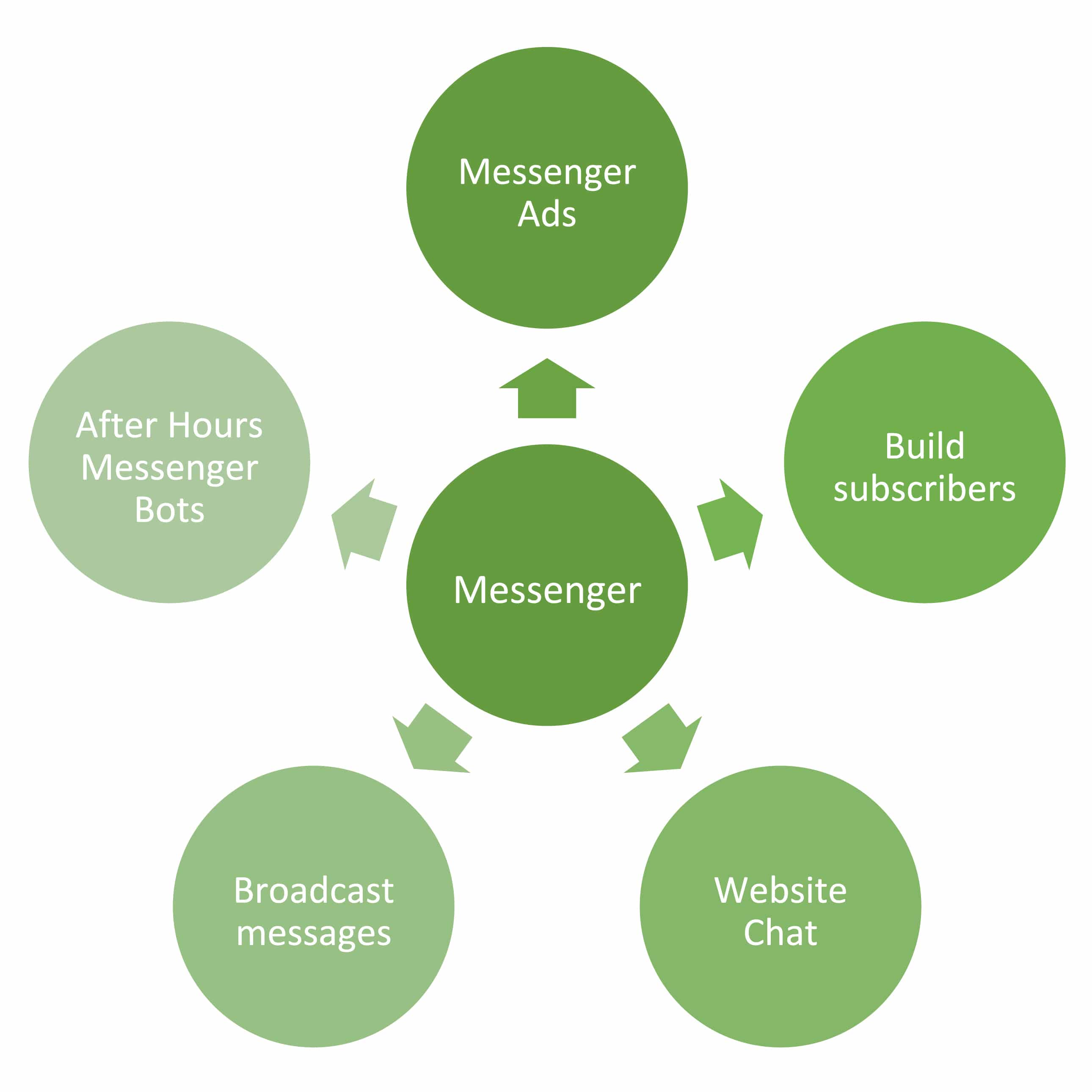
First of all, what is Messenger marketing? It’s relatively new and not all of us are going to be familiar with what it is, but basically, Messenger marketing involves building a Facebook messenger list, just like you would build an email list and then broadcasting messages to that list. It’s a little bit different to email marketing, in that it also allows you to have conditional logic when people message you a specific message, you can reply with a response based on what they have said. We can also integrate Chat bots into our Messenger advertising.
Build Subscribers
The first thing that we need to do is focus on building subscribers. I would have a hierarchy of importance when building subscriber lists. So for example, you may have the first priority is to build your email list. The second priority is to build your Facebook page, you may have your phone number list, your SMS list, all of that. Once you’ve built those other lists, you can focus on building contact with people through the Messenger platform.
The reason why it’s so important to build messenger subscribers is that apps such as WhatsApp and Facebook Messenger are becoming so prevalent in our society today and they get something like 80% open rate. It’s even stronger than SMS, stronger than email and it’s right at people’s fingertips.
To build subscribers, you will need third party software, just like you would need MailChimp for email marketing. You need third party software for your Messenger marketing to make sure that when people message your page, that they are then subscribed to your list.
Messenger Ads
The next thing is to actually run Messenger ads. For example, you could say: “if you would like to book a tour, message ‘book now’ and we will add you to our RSVP list”. It’s an option in Facebook Messenger, you can message your ads directly with Facebook or you can work with your third-party software to set it up so that it’s integrated and runs from your third-party software.
Website Chat
The next thing we can do, and I’ve seen some schools play in this area, is to have a website chatbot available. You can have a Facebook Messenger chat box on your enrollments pages or the main page of your website and if people message you using that chat box, they are then automatically subscribed to your Messenger list. It’s kind of killing two birds with one stone. It’s enabling them to chat with you live on the website but it’s also subscribing them to your Messenger list so that you can send them messages at a later date.
Broadcast Messages
Next, we need to regularly broadcast messages. This can be anything from open morning invitations to tour bookings. Whenever you are emailing your audience, just think about, would this suit a Messenger campaign as well? If you have a few hundred people on your Messenger list, it’s probably well worth it to advertise an open morning to those people that are on your list. As I said before, you’ll need third party software to do that.
After Hours Messenger Bots
Then the last element for your Messenger health is to have after-hours Messenger bots. This is great for, say someone’s looking at your website at 8:00 pm, you don’t have an enrollments team on hand, but they have a question. You can set up what’s called a Facebook Messenger chatbot where people can ask questions like, “what are your school fees?” and you set up automatic replies to engage with them in a fun and light-hearted way, while still giving them the response that they need.
You can set up for it to send them the fees, you can set it up for them to give you your opening hours, you can set it up for them to go to a tour booking page, any of those options. It’s so effective because it’s right at that point of decision when people are on your website, and they want someone to talk to, there’s no one available but they want an answer to their question. It’s engaging, it’s fun and it solves their problem of needing information that they don’t need to then go and browse your website to find.
I hope that helps you. As I mentioned before, if you haven’t done so already, work through the Digital Marketing Health checklist. I’ve got a few things for you to go through and consider for your Messenger marketing. This is a field that schools haven’t really owned yet but I really hope that in terms of grasping new, innovative marketing concepts, that this is something that a lot of schools start to integrate into their marketing. Okay, thank you.
[et_bloom_inline optin_id=”optin_8″]