
Hello everyone, welcome to the final week of the Digital Marketing Health Check for your school. I hope that this series has been helpful for you. Today, we are looking at measuring the success of your digital marketing strategy.
If you aren’t working through the digital marketing health checklist, click here to access the toolkit and get the checklist for yourself. It’s a 60-point checklist that we are working through, covering a few points in different areas each week.
I will just add a little footnote in here and say that, we don’t really want to shoot ourselves in the foot when it comes to measuring our digital marketing. As I’ve mentioned a few times throughout the series, enrollment decisions take a little while to make, and it can be anywhere from three months to a year, two years if there’s a move involved.
We don’t want to be running campaigns and then measuring them within that month and saying, “this month we spent X amount, and got Y many enrollments”. The measuring factor is more, to give you an indication of what works and what doesn’t. You’ll always want to look at your data month on month, and also year on year, just to make sure that you’re catching any of those last minute enrollments that come in after your campaign is finished.
Google Analytics
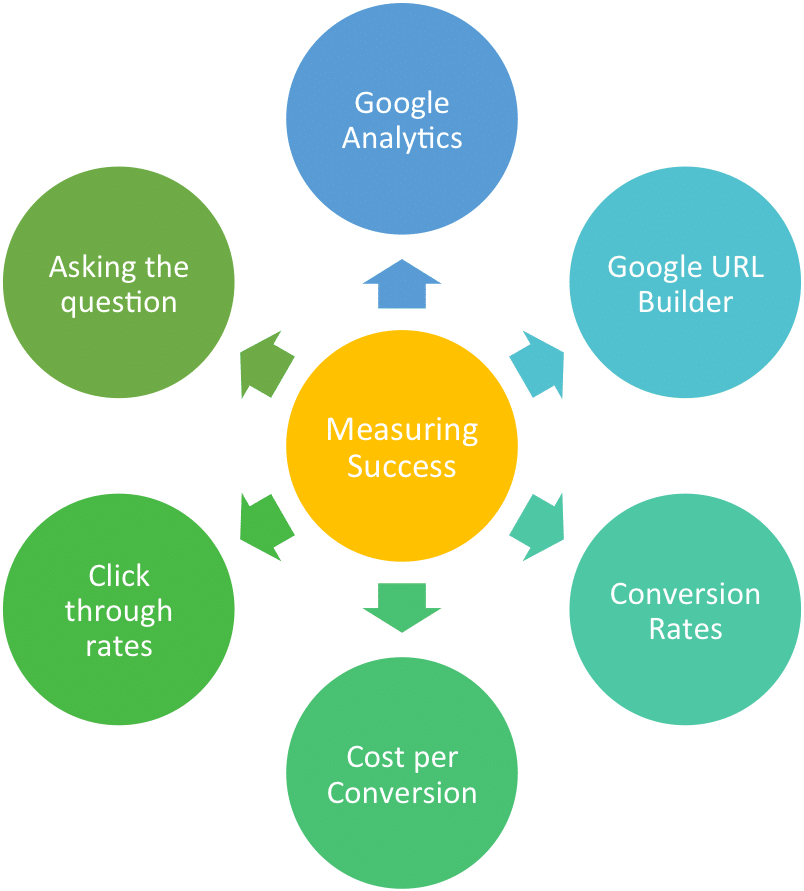
What do we need to measure our digital marketing campaigns? The first thing I recommend is that you have Google Analytics installed on your website. Google Analytics is a free tool. Most of these analytics tools are free, and you can do a lot of great measuring, and reporting with them. Once you have Google Analytics installed, then you’ll want to look at your monthly report to see the number of visitors that you are getting to your website. Have a look at the geographic reports in terms of where visitors are coming from, as well as view valuable information about audience demographics. Also look at the main enrolment pages that are enrollment pages on your website such as tour booking pages?
A problem that schools have when it comes to measuring results is school websites tend to cater to a few different audiences. One, they cater for current parents, two, they cater for enrollment inquiries, and three, the local community that might be interested in events.
What I tend to do if I’m working with a client on a longer-term basis is recommend that they have a parent section on the website or a parent sub-domain. Something like parents.yourwebsite.com as a go-to place for anything related to them. This helps to clear up your data and seperate regular visits from parents verse potential enrolments.
Google URL Builder
The next thing you will need to do once you have Google Analytics tracking set up, is you’ll want to set up a goal, and a goal can be anything from booking a tour, downloading the prospectus, registering for an open morning. Then whenever you run a digital ad, for example, if you are advertising on a third party website, on Facebook, or Google Ads, you will want to use the Google URL Builder to build a unique, trackable URL. Then you can go back to Google Analytics, look at your specific campaigns and see how many people clicked that link.
Whenever I’m testing out new advertising, I build a unique URL for that advert, and I track how it goes within that first month to see how much traffic they’re sending to my website. I use this for my client’s Facebook Ads because it gives you specific information if you are split testing two different Ads, if you use the URL parameters, then it actually gives you detailed information on how each of those Ads is performing, instead of just the overall campaign.
Conversion Rates
The next thing you’ll want to look at when measuring your marketing efforts is your conversion rates. When you’ve set up your goals in Google Analytics, you will know how many people visited, for example, a tour booking page and how many people actually clicked through and booked a tour. As a general rule of thumb, we want to have a conversion rate of 20%. When I work with clients and I’m building a landing page for them, I always aim to have a conversion rate of 20% before sending any paid traffic to the page. I recommend having those opt-ins on your website, they are easy for people to sign up to, easy to measure and track, and you can work up to a point where you’re converting at 20%. You can try split testing a new page and try different button colours, add testimonials, change the layout, maybe add a video or remove a video, sometimes simplify the content, to help increase your website’s conversion rate.
Cost Per Conversion
The next thing that you will want to measure clearly is the cost per conversion. This metric can get lost in all the data that you gather about a campaign. You’ve got so many clicks, and website visits, and this and that. But, the most important thing to look at is, how much did it cost me to get that tour booking? Or how much did it cost me to get that prospectus inquiry and to build my email list?
Click-Through Rate
You also want to look at the click-through rate, even for advertising where this is not necessarily reported. If you are advertising on a third party website, you want to look at how many people are actually clicking through to your website.
In advertising, typically as a general rule for schools, I look for a click-through rate of at least 1%. If you get 100 impressions on a Facebook Ad, I’d be looking to have at least one link click.
Asking the Question
The last thing that a lot of marketers forget to do, or have given up on doing is to ask the question when you don’t really know how a person find out about your school. There are so many different points that you can measure your success at. You can say, “we’ve got this many enrollment inquiries, this is our click-through rate, this is how many people visited our website”,
But the most important data is, of the people that actually enrolled in the college, are we closing the loop with them and asking them how they heard about us? Or is our database integrated enough that we can see the different touch points that they had with our college, and then track them all the way through to when they registered to enrol at the college.
If you find that you’re collecting too much data and there’s nothing that’s really clear, start with the people that are enrolling at your college and make sure that you can close the loop with them. They are more likely to be able to answer those questions for you or willing to invest in answering those questions for you.
I actually build a lot of custom dashboards for my school marketers, where they can have an automatic dashboard that fills up all this information in a nice user-friendly display. They can check day-to-day, they can check month-to-month, they can check every fortnight, they can check for a specific campaign. Having this data on hand, it shows them the flow of people from inquiry, through to tour booking, through to open morning attendance, through to enrollment. Having that information available on a dashboard that you can look at, at any given day, and can share with the principal vastly improves the rapport that you’ll have with the principal and the ability to report for how you are using your school’s budget.
I hope I’ve given you a bit of food for thought in terms of measuring your success. If you can get these details right, and be clear about what’s working and what’s not, you are going to achieve so much more with your school’s marketing, and you’re going to be able to grow your marketing budget year on year.
Thank you so much for taking part in the Digital Marketing Health Check Series, if you haven’t worked through the 60 point checklist, you can get it from the schools marketing toolkit linked above.